
Simple file upload
The Attachments window is simplified as follows.
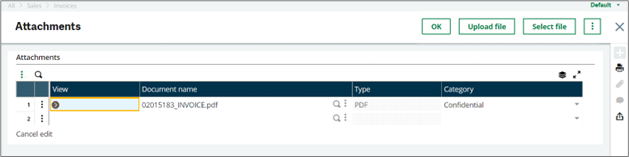
Attachments window
The following buttons are on the header:
-
Upload file: Select this button to download an attachment directly from your local device and list it immediately in the attachments table with no additional entry required. You can either select a file through the browser’s selection window or drag a file onto the upload section of the screen.
When uploaded, the file appears in the attachments list with its Document name, Type (fetched from the extension if present), and default Category set to Confidential. You can edit this information if wanted.
-
Select file: Select this button to open an additional window from which you can select a file from an existing volume on the server or upload a file from your local device onto a volume on the server, like with previous Sage X3 releases.